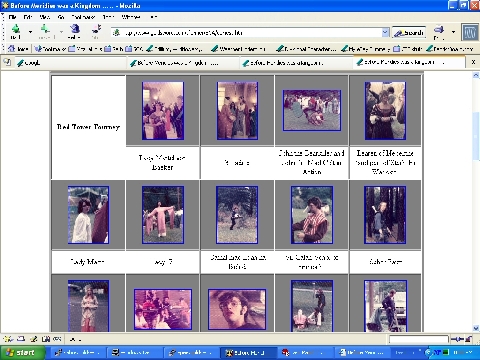
OK - so I'm wanting to convert all of my image galleries to CSS - it will make them *much* easier to maintain (and update/change). After all, I've got over 60 of these things, with more that I need to do! So I went to the web and found some CSS examples for Image Galleries - and CSS in general so I put together something that I hoped would work. Unfortunately, it doesn't.
This image to the left shows what I have -- and what I want to wind up with. Centered thumbnail images with a caption centered underneath. I'd also like to be able to *not* have to put a fixed width on these pages, but let the images flow with the browser window size.
Here is the CSS that I used for the trial.
<style type="text/css">
div.fixedWidth { width: 766px; border: 8px double #cccccc;
	       background-color: "white"; vertical-align: "middle"; }
div.float { float: left; vertical-align: "middle"; }
h1,h2, h3,p { text-align: "center"; background-color: "white";}
div.container { border: 8px double #cccccc; background-color: "white";
	      vertical-align: "middle"; width: "auto"; }
div.spacer { clear: both; }
div.slide { border: 2px solid #fff; height: 150px; width: 150px;
	  text-align: "center";
	  vertical-align: "middle"; background-color: #cccccc;  }
div.slideH { border: 2px solid #fff; height: 150px; width: 150px;
	   text-align: "center"; vertical-align: "middle";
	   background-color: #cccccc; padding-top: 29px; }
div.slideV { border: 2px solid #fff; height: 150px; width: 150px;
	   text-align: "center"; vertical-align: "middle";
	   background-color: #cccccc; padding-top: 12px; }
div.caption { text-align: "center"; vertical-align: "middle";
	    width="150"; background-color="white";
	    margin-bottom: "inherit"; }
div.event { text-align: "center"; width: 150px; height: 150px;
	  vertical-align: "middle"; background-color="white"; }
</style>
The HTML that created the first set of images is below. Click on the image to see the larger version.
<div class="container">
  <div class="spacer"> </div>
    <div class="float"
      <div class="event"><h2>Red Tower Tourney</h2></div></div>
    <div class="float">
      <div class="slide"> <a href="./Images/martel1.jpg"> <img src="./Images/martel1-t.jpg"> </a></div>
      <div class="caption">Lady Martel von Baeker</div></div>
    <div class="float">
      <div class="slide"> <a href="./Images/ladyLadyLady.jpg"> <img src="./Images/ladyLadyLady-t.jpg"> </a></div>
      <div class="caption">3 Ladies</div></div>
    <div class="float">
      <div class="slide"> <a href="./Images/madceltBearkillerAction.jpg"> <img src="./Images/madceltBearkillerAction-t.jpg"> </a></div>
      <div class="caption">John the Bearkiller and John the Mad Celt in Action</div></div>
    <div class="float">
      <div class="slide"> <a href="./Images/learen.jpg"> <img src="./Images/learen-t.jpg"></a></div>
      <div class="caption">Learen of Nepenthe (and part of Starhelm Warloke)</div></div>
    <div class="float">
      <div class="slide"> <a href="./Images/martel2.jpg"> <img src="./Images/martel2-t.jpg"></a></div>
      <div class="caption">Lady Martel</div></div>
    <div class="float">
      <div class="slide"> <a href="./Images/lady17.jpg"> <img src="./Images/lady17-t.jpg"></a></div>
      <div class="caption">lady17</div></div>
| Internet Explorer 6.0.2 | Netscape 7.1 | Mozilla 1.7 |
|---|---|---|
 |
 |
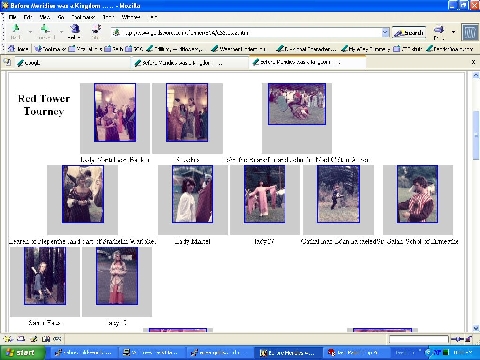 |
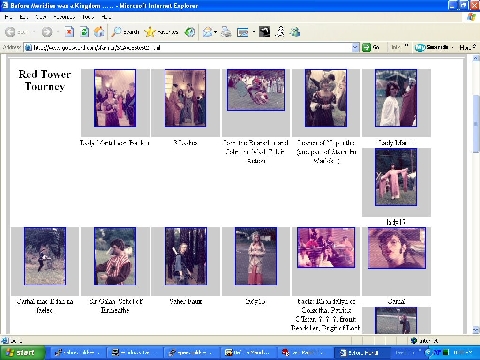
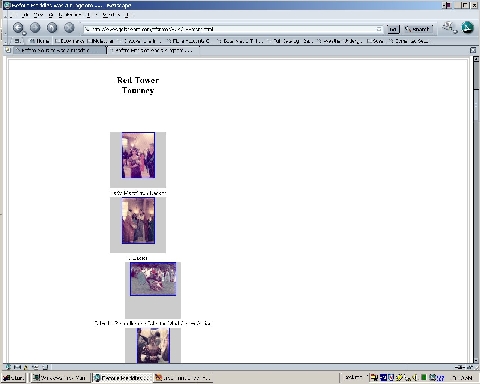
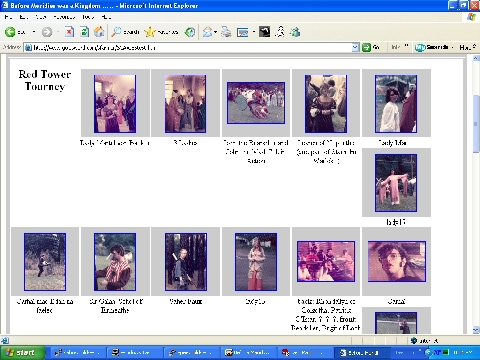
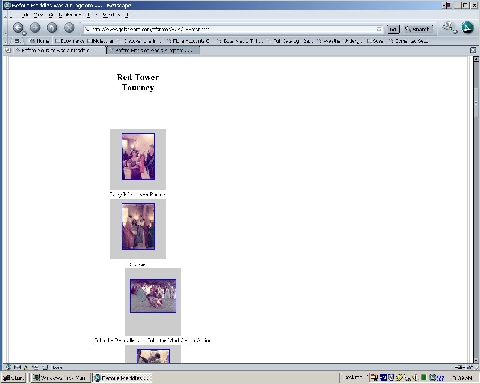
As you can see it doesn't work. The images are centered left-to-right; but not top-to-bottom. While I.E. centers the caption and works within the stated width for the "box" of 150 pixels, Netscape and Mozilla don't. Granted they center the image over the text, but the text is "full length" not broken to fit the stated width.
In addition, there's this ugly wrapping thing going on with I.E. -- it's not wrapping to the left margin, but only to the first "non-blank" space. Seems like there ought to be a way to "inherit" the height of the preceeding sister "box." I can force a break to the left margin, but that defeats the whole "window independant" thing that I wanted to have. That still doesn't deal with the fact that the images aren't centered in their "box." You'll also notice that while Mozilla is doing the whole "float left" thing (albeit with the tacky captions), Netscape isn't. :-(
If you paid attention, you probably noticed that there are already definitions for "slideH" and "slideV" in the above block of CSS. The thought occurred to me that if I set a margin at the top of the image then I might be able to center it in the "box." I changed the appropriate HTML (you'll forgive me if I don't repeat that whole thing all over again) and tried once again. [If you really want to see all that HTML for yourself, then the two files in question are CSStest2.html which has the images not centered, and CSStest.html which is the file with the margin test.] The resulting images are in the table below.
| Internet Explorer 6.0.2 | Netscape 7.1 | Mozilla 1.7 |
|---|---|---|
 |
 |
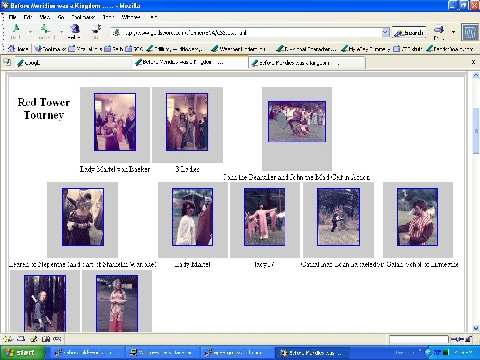 |
You'll notice that while the images are sortof centered in the I.E. shot, (it was an eyeball guess!), they're less centered in the Netscape/Mozilla attempts. In fact, it appears that Netscape/Mozilla are *adding* to the vertical size of the 150x150 "box." This is especially evident in the Mozilla image which is doing the "float left" thing -- look at how much taller the horizontal image in the top row is than the other images. :-(
If you have ANY suggestions, please email me at sfarmer@goldsword.com
Thanks!